Skip to content
New · free · MIT · v0.1.0

WarrenPrivate links between your machines.

One Rust binary (relay, node daemon and CLI). Enroll your machines with a relay you run yourself, then share, forward, nc or ssh any TCP port between them from anywhere, or publish a local port on a public HTTPS name.

Mac (Apple silicon) · Linux x86_64 · Windows: coming · no telemetry, no update check

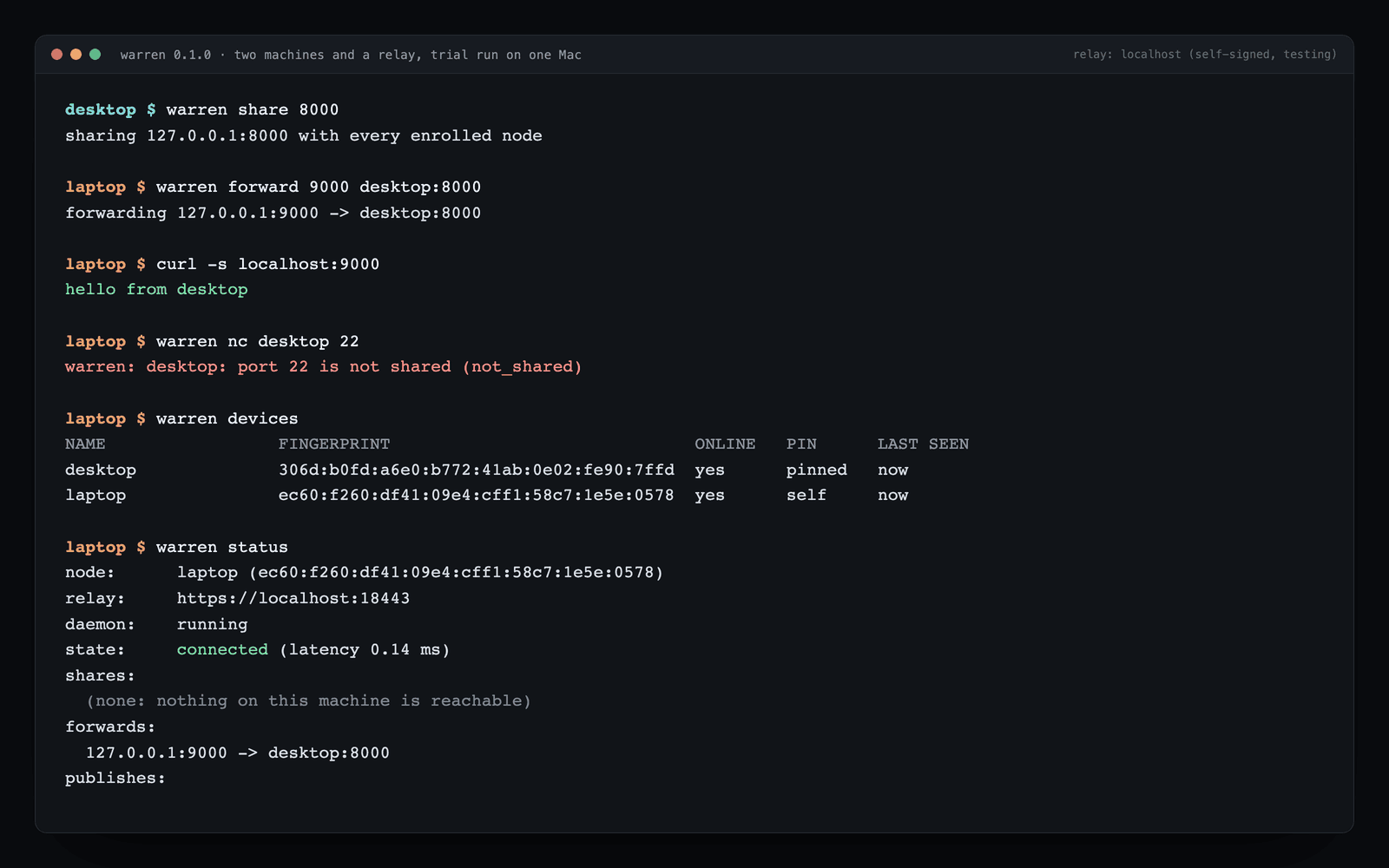
A real Warren v0.1.0 trial session: desktop shares port 8000, laptop forwards to it and gets a reply, port 22 is refused as not shared, and both machines show pinned keys
A real v0.1.0 session: two machines and a self-signed relay on one Mac, using the testing setup from the relay docs.

Private links are end-to-end encrypted.

Inside every stream the two machines run Noise_IK_25519_ChaChaPoly_BLAKE2s. The relay forwards ciphertext it cannot read, and an end-to-end test captures everything the relay receives and sends and fails if the plaintext ever appears.

The destination decides.

Nothing is reachable until that machine runs warren share PORT, optionally only for named machines. The check happens on the destination, so even a compromised relay cannot open an unshared port.

Keys are pinned.

Each machine remembers a peer's key the first time it sees it and refuses a changed key until you verify the new fingerprint with warren trust NAME --expect FINGERPRINT.

One outbound connection on 443.

Everything rides one outbound WebSocket, for networks that allow outbound WSS on 443: no inbound ports on your machines, no kernel driver, no third-party account.

Version 0.1.0

Download the binary, or build it.

Release binaries are built in CI with the build machine's paths stripped. With Rust 1.88 or newer: cargo install --locked --git https://github.com/willykeenan/warren --tag v0.1.0

macOS

Apple silicon (aarch64)

The platform warren has been used on so far.

Download macOS

Linux

x86_64 (glibc)

Built and tested in CI on Linux; not yet run on real Linux machines. Please report problems.

Download Linux

Quick start.

You need a small server with a public IP for the relay, a DNS name pointing at it, and two machines. Enrollment codes are single use and valid for ten minutes. The full walkthrough, including a one-machine trial with a self-signed relay, is in the README.

# on the relay (a small server with a public IP)
sudo warren relay --domain relay.example.com --acme you@example.com --state /var/lib/warren
sudo warren relay invite --state /var/lib/warren     # one code per machine

# on machine b (the one with the service)
warren join CODE --relay https://relay.example.com --name b
warren install        # start at login (launchd / systemd --user)
warren share 22

# on machine a
warren join CODE --relay https://relay.example.com --name a
warren install
warren ssh b          # or: warren forward 2222 b:22
warren devices        # compare fingerprints on both machines

Status and limitations. Read before relying on it.

  • • Used on macOS so far. Linux is supported by the code and the test suite passes on Linux in CI, but warren has not been run on real Linux machines yet.
  • • Automatic certificates (ACME HTTP-01) are unit-tested but not yet tested against a live CA. Start with the Let's Encrypt staging directory, or bring your own certificate.
  • • Trust on first use: the first key a machine sees for a peer comes from the relay. Compare fingerprints with warren devices on both machines after enrolling.
  • • One relay, no direct connections. All traffic goes through your relay; if it is down, nothing connects.
  • • TCP only, and the relay's default listeners are IPv4.
  • • Published HTTPS names are TLS-terminated at the relay, which sees that traffic in plaintext. Private links never are.
  • • Windows: coming. There is no Windows or Intel Mac binary in v0.1.0.

The 1.6 to 1.9 Gbit/s private-link throughput in the README was measured on loopback, not over the internet.

Your relay. Your keys. Your ports.

Warren is free and MIT licensed, built by William Keenan at KE Studios.