See real sound activity
Live PCM meters distinguish an app producing audio from an idle audio session.
KE Volume Mixer puts real per-app audio meters, volume sliders, and mute controls in the top-right macOS menu bar. Your mix stays on your Mac.
Version 0.1.0 is an honestly labeled public Preview, not a production-ready or App Store release. Control-click to open it the first time.
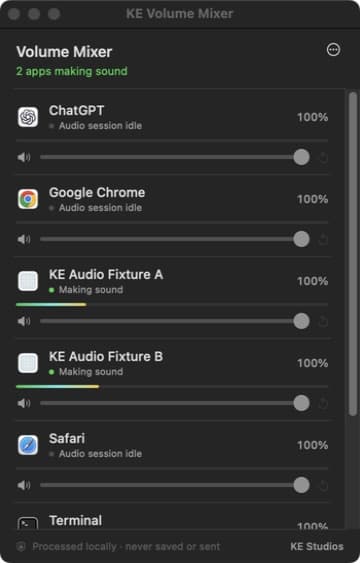
Actual macOS build during simultaneous-app QA. Activity comes from audio samples, not merely from an app being open.
Open one compact popover, find the active app, and change only that source.
Live PCM meters distinguish an app producing audio from an idle audio session.
Adjust or mute one app without changing your Mac’s master output volume.
Volume and last-unmuted levels persist by app, including across relaunches.
Private audio routes rebuild when the default output device changes.
The top-right icon changes when apps are making sound. No Dock clutter required.
No account, network client, analytics, telemetry, kernel extension, or virtual driver.
The extra open step exists because Apple Developer ID signing and notarization are not yet available for this release.
Open the DMG and drag KE Volume Mixer into Applications.
This Preview is not Apple-notarized. Control-click the app in Applications, choose Open, and confirm. If needed, use Privacy & Security → Open Anyway.
macOS asks for Screen & System Audio Recording. The app needs app-output buffers to meter and adjust audio; it never captures your screen.
Play audio, open the speaker/waveform icon, then move the slider for the app you want.
KE Volume Mixer has no network client or audio-file writer. macOS accurately labels its permission as Screen & System Audio Recording because Core Audio must expose each app's output buffer. The app does not capture the screen.
The optional Launch at Login (Preview) toggle writes only ~/Library/LaunchAgents/dev.kestudios.volume-mixer.login.plist, bound to the exact app in Applications with RunAtLoad and no KeepAlive. Turn the toggle off first, quit, and move the app to Trash. If the app is already gone, boot out only dev.kestudios.volume-mixer.login and delete only that exact plist. You can also revoke its system-audio permission and remove saved preferences with defaults delete dev.kestudios.volume-mixer. Version 0.1.0 is the first Preview, so rollback means removal.
File: KE-Volume-Mixer-0.1.0-universal-preview.dmg · 1,785,366 bytes
10fa8882afa09747e004960b97b1ad95032ccd727334e858d1d2bae1d4788ec7KE-owned source is MIT licensed. The Core Audio process-tap foundation is derived from Siddharth Rout's MIT-licensed dB project at ac95a751686c68aa161a01244e083daf0d939350. Full notices and provenance are embedded in the app.